

Main Brands:
Bently, Triconex, Woodward, Foxboro,Reliance, ABB, Allen-Bradley, Motorola, GE, Yaskawa, Bosch Rexroth, ACSO, YOKOGAWA, NI, ICS Triplex, Kollmorgen, Mitsubishi, MOOG, Emerson, B&R, SST, ALSTOM, EPRO, HIMA, HONEYWELL prosoft, AMAT.
Wei Xiu zhu
WhatsApp:+852 5796 0986
Wechat:13395077993
Zhejiang Yiwu Beixun Automation Technology Co., Ltd
China (Zhejiang) Pilot Free Trade Zone, No. 2 Chunpai Road, Beiyuan Street, Yiwu City, Jinhua City, 7F 7059
website:www.bxplc2.com
Email: 3076784238@qq.com
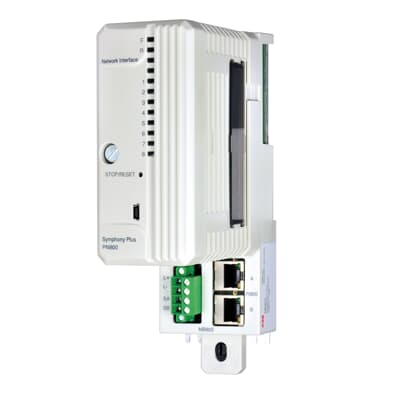
The ABB PNI800 (3BSE008544R1) is a high-performance Process Node Interface designed for industrial automation systems. It serves as a critical communication gateway between field devices and control systems, enabling reliable data exchange in demanding industrial environments.
Related Series:
ABB UFC765AE102 3BHE003604R0102
ABB LWN2660-6 3BHL000986P7002
ABB KUC755AE117 3BHB005243R0117
ABB UFC760BE143 3BHE004573R0143
Technical Specifications
Hardware Configuration
- Processor: 32-bit RISC processor
- Memory: 128 MB RAM, 512 MB Flash
- I/O Ports: 4 x Ethernet, 2 x USB, 1 x Serial
- Expansion Slots: 2 x PCI Express
Environmental Ratings
- Operating Temperature: -20°C to +70°C
- Storage Temperature: -40°C to +85°C
- Humidity: 5% to 95% non-condensing
- IP Rating: IP54
Electrical Specifications
- Power Supply: 24 VDC ±10%
- Power Consumption: Max 30W
- Redundancy: Dual power inputs
- Protection: Overvoltage, reverse polarity
Supported Communication Protocols
| Protocol | Version | Interface | Description |
|---|---|---|---|
| EtherNet/IP | 2.0 | Ethernet | Industrial Ethernet protocol for real-time control |
| Modbus TCP | 1.1b | Ethernet | Open industrial communication protocol |
| PROFINET IO | V2.3 | Ethernet | Real-time Ethernet automation standard |
| OPC UA | 1.04 | Ethernet | Unified Architecture for industrial communication |
| BACnet/IP | 2016 | Ethernet | Building automation and control networks |
- Hardware Installation
- Mount the PNI800 in a suitable location following DIN rail mounting instructions
- Connect power supply to the terminal block (TB1)
- Connect network cables to Ethernet ports as required
- Install any additional I/O modules in the expansion slots
- Initial Configuration
- Connect to the PNI800 using the web interface (default IP: 192.168.1.1)
- Log in with default credentials (admin/admin)
- Change the default password immediately
- Configure network settings for your environment
- Protocol Configuration
- Enable required communication protocols
- Configure protocol-specific parameters
- Set up data mapping between protocols
- Test communication with connected devices
- System Integration
- Integrate with your control system
- Configure alarm settings and notifications
- Set up monitoring and diagnostics
- Implement redundancy if required
Maintenance Schedule
| Maintenance Task | Frequency | Description |
|---|---|---|
| Firmware Update | Quarterly | Check for and apply latest firmware updates |
| Dust Removal | Monthly | Clean air filters and remove dust from ventilation |
| Backup Configuration | Monthly | Create and store backup of current configuration |
| Battery Replacement | Annually | Replace backup battery to ensure data retention |
| Full System Check | Semi-annually | Comprehensive inspection of all components and connections |

Leave a comment
Your email address will not be published. Required fields are marked *